Learnings and reflections from Extreme Programming Conference!

Alvin Toffler, renowned American author, known also for his works discussing the "Digital revolution" once said "The illiterate of the 21st century will not be those who cannot read and write, but those who cannot learn, unlearn, and relearn."

Hello,

At outset of my career I chose not to be modern illiterate :) hence I keep learning aggressively whenever I get chance, keep unlearning what is not relevant and keep relearning stuffs whenever required. With learning as a prominent goal in mind, I had a hectic but really productive learning weekends recently. It started with two days' workshop (24-25th July) on "High Impact Presentation" by Dale Carnegie Training conducted by Mindtree. Then two days' workshop (8-9th August) on "Extreme Programming Conference" by industry experts again conducted by Mindtree and finally attended "Judges Training Program" on 10th August conducted by Toastmasters International.

Out of these trainings I underwent, I thought it's my duty to share the knowledge I gained particularly from " Extreme Programming Conference"  (http://www.xpconference.in/) since it was Mindtree who gave me the opportunity to attend it and it would be relevant for most of you (needless to mention that you can contact me directly if you want me to share my experiences on other trainings as well :) ). I think it’s enough for we developers to know the terminology, rest we all are expert to dig into it with our Google god J. Hence, I will at least try to share all the terminologies that I learnt in this mail and references wherever possible.

eXtreme Programming is one of the agile software development method which is leveraged to improve software quality and responsiveness to changing customer requirements. It advocates frequent releases in short cycles to improve productivity.


eXtreme Programming Values
a.       Communication
b.      Simplicity
c.       Feedback
d.      Respect
e.      Courage

eXtreme Programming Philosophies
a.       Collective ownership
b.      Continuous delivery
c.       Sustainable pace

Sessions on Continuous delivery
Key takeaways were -
a.       Architecture can strangle CD in situations like
                                       i.      Non clustered architecture
                                     ii.      Blocking requests for long running steps
                                    iii.      Hardcoded IP addresses for endpoint IPs or linked server in Database
b.      Rotating teams frequently to cross pollinate knowledge  (tools + techniques) (like DevOps)
c.       Feature based trunk development instead of using branches.
d.      Every change to the system should be releasable. Should release any version at the push of a button.
e.      Never opt for branch based development, rather user trunk based.


Full stack developer (FSD) (near to DevOps)
FSD is capable of performing tasks at any level on entire tech stack. It may involve
a.       Infra
b.      API/Backend
c.       Query DB
d.      UI
e.      Project Mgt


They are also called Packaged Geek in eXtreme Programming.

Don't Branch in Continuous delivery
a.       Branching is not recommended in extreme Programming, which is being followed by company like Facebook & Google
b.      Only trunk based development is recommended
c.       Frequent check ins are allowed in single branch trunk
d.      Bugs should be fixed on trunk and merge with release branch
e.      Release branches are never merged back to trunk
f.        Release branches are short lived, frequently replaced by newer release branches

Then How to roll back in case of issues
                                       i.            Instead of branching, features should toggled on and off, as per requirement. Question - We should get rid of branching practice. Branching there are changes which may impact multiple places like presentation logic changes etc.
                                     ii.            As soon as a feature is released, get rid of it.
                                    iii.            Toggles are applied at UIs
                                   iv.            Features with no UI, the toggle will be in the app code
1.       Techniques like polymorphic substitution and dependency injection should be used to avoid crude conditional test
                                     v.            Pipelines for different permutations of toggles for releases should be setup
1.       IF either of the build fails, it implies a bad commit

Feature toggle types
                                       i.            Release - partial features, temporary
                                     ii.            Business - certain class of users, permanent
                                    iii.            Runtime - easier rollbacks, run tests with various configurations of features
                                   iv.            Build - new feature codebase is not compiled

Book Reference provided
Uncle Bob's  - Clean Coder & extreme programming in practice

The Coding Dojo Handbook - Emily

Also, I created a presentation out of it, here is the Slideshare link - 


Cloud Platforms adding Strength to Digital Solutions!


Cloud Platforms are getting stronger and humongous day by day. The two prominent cloud platforms that I got chance to work with and arguably the Market leaders - Microsoft with its Azure Cloud and Amazon with its Amazon Web Services (AWS), has a long list of services now offered through Cloud Platform. You can build Infrastructure, develop Web Apps & Mobile Apps, manage identity and access, do analytics, Internet of things, Database, IDEs and what not.april-hackathon-web-550x367

As a Digital Architect, I recently got chance to evaluate various offerings by cloud platform vendors and to recommend best ones as a part of Digital transformation being done for a customer. Following is what I went with and it looked to be a reasonable recommendations -

Infrastructure requirements – We opted for Azure VMs & Active Directory for managing servers. Every Digital WCM needs good amount of server resources, at the least 8 servers – Author and Publish instance for each DTAP (Dev, Test, Acceptance & Prod) environments. And if WCM is like Tridion, number may be more than double to support Dedicated Publisher, XPM and SmartTarget environments. Add to it another commonly used product for enterprise search like Solr, additional one server for each DTAP servers. Then add some DR servers and clustered servers for production. Did you realize, I have already reached to count of 40 servers Smile. Managing these many servers can be efficient only on Cloud.

Cache dynamic content – Its important that all the data being fed to Digital system is cached, it increases performance vastly. I have seen people caching static files and pages but forgetting the dynamic data, which becomes problem later on. Continuous improvements are going in Caching mechanisms, hence There are multiple option for Cloud Cache even from single vendor Azure, it has AppFabric, Managed Cache and Redis. We opted for Managed Cache, however Redis is the way forward.

Cache static files -  We opted for Azure CDN with origin server as Azure Storage to provide this solution. No Digital solutions now can live without CDN. Static files form huge chunk of the whole solution  for any Digital System. No customer are now ready to bear the latency of static files at any of their location due to non-availability of CDN.

Media files smooth rendering across browsers and devices – This is another important requirement any Digital transformation demands for. There are huge numbers of video types and browsers, some types may run on one browser but may not on other browsers or devices. To cater to this problem, Azure Platform offers something beautiful called Azure Media Services. Configure it with a origin server like Azure storage and it will do the rest of encoding, streaming, indexing etc

Email solution – Traditional emails servers are hard to manage and sometimes even not easily compatible with Cloud Platforms, hence we opted for cloud based email solution called SendGrid. it had seamless integration with Azure servers.

Azure Active Directory – Offers Single sign on facility, works with multiple platforms and devices, supports multi factor authentication.

The list of Cloud offerings for Digital platform is too long, but I have listed only those which I had used in the recent Digital Transformation. Thank you!

Angular JS – my quick thoughts !


    What is AngularJS
    AngularJS is a MVC framework that defines numerous concepts to properly organize your web application. Your application is defined with modules that can depend from one to the others. It enhances HTML by attaching directives to your pages with new attributes or tags and expressions in order to define very powerful templates directly in your HTML. It also encapsulates the behavior of your application in controllers which are instantiated thanks to dependency injection. Thanks to the use of dependency injection, AngularJS helps you structure and test your Javascript code very easily. Finally, utility code can easily be factorized into services that can be injected in your controllers. 
    Philosophy
    1. Angular is what HTML could have been if it had been designed for applications.
    2. HTML is a great declarative language for static documents. It does not contain much in the way of creating application.
    3. Building web-applications is an exercise in what do I have to do, so that I trick the browser in to do what I want.
    4. That's why we have frameworks - set of utility functions and libraries for DOM manipulation.
    5. Angular takes another approach.
    6. Angular teaches the browser new syntax.
    Comparison with static HTML
    clip_image001
    Dynamic HTML
    clip_image002
    Key features:
    1. Model View Controller architecture
    2. A well known and proven architecture
    3. Declarative two way data binding
    4. Automatically synchronizes values between Model and View
    5. Dynamic templates
    6. Makes it very easy to update the user interface
    7. Dependency injections
    8. Code dependencies are automatically injected where needed
    9. Extends HTML with directives
    10. Lots of powerful standard directives or create your own
    11. Build with testing in mind
    12. Makes it much easier to unit test different parts

    Architecture
    clip_image003
    clip_image004
    General References & useful resources
    1. http://todomvc.com/
    2. http://angularjs.org/
    3. http://pivotal.github.io/jasmine/
    4. http://yeoman.io/
    5. http://karma-runner.github.io/0.8/index.html
    6. http://rmurphey.com/blog/2012/04/12/a-baseline-for-frontend-developers/
    7. https://github.com/cer/polyglot-restaurant
    8. http://stephanebegaudeau.tumblr.com/post/48776908163/everything-you-need-to-understand-to-start-with 

Windows Azure - Quick Overview


Windows Azure is Microsoft's platform for supporting public cloud. We can use Azure to :

  1. Build a web application that’s runs in Microsoft Datacenters.
  2. Just to store data, used by application running on-premises
  3. To create virtual machines for development and testing to run SharePoint and other applications.
  4. To build massively scalable applications with lots and lots of users.

Getting to know the basics of Azure components gives good idea of Azure platform, so here are the Components of Windows Azure

  1. Execution Models -
    1. Virtual Machines - This approach is generally called IaaS (Infrastructure as a service), wherein we can create virtual machines on demand, which can be paid per hour of usage. Windows Azure VM can also be used as an extension of our on-premise datacenter, running applications like SharePoint. Its possible to create Windows domains in the cloud by running Active Directory in Windows Azure VMs
    2. Web sites - On of the most common usage of cloud is to host Website and application without the hassles of administration, which is what Windows Azure Websites provides. We can move an existing IIS web site into Azure website unchanged, or we can have a new one created directly in the cloud. Windows Azure Web Sites supports .NET, PHP, and Node.js, along with SQL Database and (from ClearDB, a Microsoft partner) MySQL for relational storage. It also provides built-in support for several popular applications, including WordPress, Joomla, and Drupal. The goal is to provide a low-cost, scalable, and broadly useful platform for creating web sites and web applications in the public cloud.
    3. Cloud services - Windows Azure Cloud Services is designed expressly to support scalable, reliable, and low-admin applications, and it's an example of what's commonly called Platform as a Service (PaaS). To use it, you create an application using the technology you choose, such as C#, Java, PHP, Python, Node.js, or something else. Your code then executes in virtual machines (referred to as instances) running a version of Windows Server. However, this VM is different than Windows Azure VM since here Azure manages VM itself in doing things like installing OS patches, rolling out new images, monitoring VMs, restarting any that fail etc. While creating instance one out of two roles could be selected - web or worker - difference is that web runs on IIS and worker not.
  2. Data management -
    1. SQL Database - For relational storage, Windows Azure provides SQL Database. For anybody familiar with SQL Server (or another relational database), using SQL Database is straightforward. But SQL Database isn't just a DBMS in the cloud-it's a PaaS service. You still control your data and who can access it, but SQL Database takes care of the administrative grunt work, such as managing the hardware infrastructure and automatically keeping the database and operating system software up to date. SQL Database also provides a federation option that distributes data across multiple servers. This is useful for applications that work with large amounts of data or need to spread data access requests across multiple servers for better performance.
    2. Tables - Tables is example of a NoSQL approach called a key/value store. Windows Azure Tables let an application store properties of various types, such as strings, integers, and dates. An application can then retrieve a group of properties by providing a unique key for that group. While complex operations like joins aren't supported, tables offer fast access to typed data. They're also very scalable, with a single table able to hold as much as a terabyte of data. And matching their simplicity, tables are usually less expensive to use than SQL Database's relational storage.
    3. BLOBs - The third option for data management, Windows Azure Blobs, is designed to store unstructured binary data. Like Tables, Blobs provides inexpensive storage, and a single blob can be as large as one terabyte. An application that stores video, for example, or backup data or other binary information can use blobs for simple, cheap storage.
  3. Business Analytics
    1. SQL Reporting - One of the most common ways to use stored data is to create reports based on that data. To let you do this with data in SQL Database, Windows Azure provides SQL Reporting. A subset of the reporting services included with SQL Server, SQL Reporting lets you build reporting into applications running on Windows Azure or on premises. The reports you create can be in various formats, including HTML, XML, PDF, Excel, and others, and they can be embedded in applications or viewed via a web browser.
    2. Hadoop - For many years, the bulk of data analysis has been done on relational data stored in a data warehouse built with a relational DBMS. This kind of business analytics is still important, and it will be for a long time to come. But what if the data you want to analyze is so big that relational databases just can't handle it? The dominant technology today for analyzing big data is Hadoop. An Apache open source project, this technology stores data using the Hadoop Distributed File System (HDFS), then lets developers create MapReduce jobs to analyze that data. HDFS spreads data across multiple servers, then runs chunks of the MapReduce job on each one, letting the big data be processed in parallel.
  4. Caching -
    1. In-Memory Caching - Keeping an in-memory copy of frequently accessed data can improve application performance. We can use Windows Azure's in-memory Caching to do this. A Cloud Services application can store data in this cache, then retrieve it directly without needing to access persistent storage.
    2. CDN - The CDN has dozens of sites around the world, each capable of storing copies of Windows Azure blobs. The first time a user in some part of the world accesses a particular blob, the information it contains is copied from a Windows Azure datacenter into local CDN storage in that geography. After this, accesses from that part of the world will use the blob copy cached in the CDN-they won't need to go all the way to the nearest Windows Azure datacenter. The result is faster access to frequently accessed data by users anywhere in the world.
  5. SDKs - Microsoft currently provides language-specific SDKs for .NET, Java, PHP, Node.js, and Python. There's also a general Windows Azure SDK that provides basic support for any language, such as C++. These SDKs help you build, deploy, and manage Windows Azure applications. They're available either from www.windowsazure.com or GitHub, and they can be used with Visual Studio and Eclipse. Windows Azure also offers command line tools that developers can use with any editor or development environment, including tools for deploying applications to Windows Azure from Linux and Macintosh systems.

References -

http://www.windowsazure.com/en-us/develop/net/fundamentals/intro-to-windows-azure/#start

https://www.windowsazure.com/en-us/develop/net/tutorials/get-started/

Approaches to Cloud Computing


The idea behind any cloud computing proposal is for you to pay only for what you use, scaling up or down as per business requirements. This dynamic capability offered by service providers is called utility computing and is analogous to your utility service providers’ model: they charge you by the amount of energy you use. You can scale back your energy bill by reducing the energy usage, or your energy bill will go up during peak load. If you invest in a highly available and scalable infrastructure on premise, scaling in either direction based on demand is difficult.

So, in the long term, cloud platforms are designed to reduce your average operating costs by giving you the flexibility to commission and decommission infrastructure depending on the business needs.

Term "Cloud" specifically means applications, platform, infrastructure and consumer services offered by service providers to build applications for the Internet. Acronyms like software as a service (SaaS), platform as a service (PaaS), Infrastructure as a cloud (IaaS), software plus service (S + S), and database as a service (DaaS) all represent a piece of cloud services in one way or the other. Let's discuss three common approaches viz. - SaaS, PaaS and IaaS.

Software as a Service

Software as a Service (SaaS) makes use of a cloud computing infrastructure to deliver one application to many users, regardless of their location, rather than the traditional model of one application per desktop. Instead of installing and maintaining software, you simply access it via the Internet, freeing yourself from complex software and hardware management. Most SaaS applications can be run directly from a Web browser, without any downloads or installations required. SaaS eliminates the need to install and run applications on individual computers. With SaaS, it’s easy for enterprises to streamline their maintenance and support, because everything can be managed by vendors: applications, runtime, data, middleware, O/S, virtualization, servers, storage, and networking. Gmail is one famous example of an SaaS mail provider.

Platform as a Service

In this approach, you rent a platform on which you deploy your applications without configuring the infrastructure and without the limitations of the SaaS approach. What developers gain with PaaS is a framework they can build upon to develop or customize applications. PaaS makes the development, testing, and deployment of applications quick, simple, and cost-effective, eliminating the need to buy the underlying layers of hardware and software. Similar to the way that you might create macros in Excel, PaaS allows you to create applications using software components that are controlled by a third-party vendor. The Windows Azure platform fits best in the PaaS category, because it doesn’t provide access to the underlying virtualization environment or operating system details such as the network interface, IP configuration, and disk management.

Infrastructure as a Service

Infrastructure as a Service is sometimes referred to as Hardware as a Service (HaaS), in which Vendors provide the hardware infrastructure to build solutions, and you rent the hardware such as servers, load balancers, firewall and cables. The service provider owns the equipment and is responsible for housing, running and maintaining it. The client typically pays on a per-use basis. You can scale up by requesting more servers and reconfiguring the load balancer without purchasing more hardware. Similarly, you can scale down at any time by reconfiguring the infrastructure you rented from the cloud service provider.

Lastly, on a lighter note :)

cloud-joke

References -

Web Debugging with Fiddler


Fiddler is a Web Debugging Proxy which logs all HTTP(S) traffic between your computer and the Internet. Fiddler allows you to inspect traffic, set breakpoints, and "fiddle" with incoming or outgoing data. Fiddler includes a powerful event-based scripting subsystem, and can be extended using any .NET language.

Fiddler is freeware and can debug traffic from virtually any application that supports a proxy, including Internet Explorer, Google Chrome, Apple Safari, Mozilla Firefox, Opera, and thousands more. You can also debug traffic from popular devices like Windows Phone, iPod/iPad, and others.

Below is the home screen for Fiddler:

clip_image001[4]

Let's go through some of the most useful features of Fiddler quickly:

  1. Web Sessions - On the left pane, all the traffic is captured. Using this session, we can compare the sessions by simply selecting two sessions, right clicking and choosing compare command.
  1. Statistics - Statistics seen in the right pane shows the information for selected sessions in text and graphic format as seen below.

clip_image002[4]

Inspectors

Inspectors allow you to visualize requests and responses in meaningful ways. When you double click on a session fiddler takes you to the Inspectors tab for that session. Below is a snapshot

clip_image003[4]

QuickExec

There is a little textbox with black background color and green forecolor on the bottom of Fiddler form where you can run some very useful commands. To see a complete list of available commands type 'help' and enter. Its very handy in using some quick commands like setting and removing the breakpoints.

Breakpoints

We can put breakpoints on request or response using Web Session List. Breakpoints can be put using Rules menu>Auto Breakpoints or status bar or QuickExec. In the QuickExec box type in 'bp' and enter. This will show you a handy help popup dialog that lists the breakpoint commands.

When the breakpoint is set the next time you make a request or receive a response that fulfils the breakpoint's requirements the breakpoint is hit and you get the opportunity to change the traffic.

AutoResponder

AutoResponder is a very handy tool. It allows you to fake server's responses. If you think about it, Fiddler is sitting between you and the web server and nothing can stop it from returning the response locally without hitting the server, and that is basically what AutoResponder does. You can configure AutoResponder to respond to specific requests and let the others through, or you can ask it to only respond to the traffic you expect and block the rest. AutoResponder uses some rules to match the request. From Fiddler's reference

Request Composer

The Composer allows you to craft custom requests to send to a server. You can either create a new request manually, or you can drag and drop a session from the Web Sessions list to create a new request based on the existing request.

Filters

The Filters tab enables you to quickly filter out traffic that is not of interest.

Fiddler Extensions

There are some great Fiddler free to use extensions at http://www.fiddler2.com/fiddler2/extensions.asp

Fiddler Timeline

Fiddler's Timeline View allows you to visualize the HTTP(S) traffic on a "waterfall" diagram. Hovering over any entry will show more information about the entry. Double-clicking the entry will inspect that session.

Conclusion

I hope this gives a headstart for the ones who have not yet explored a web debugging tool powerful as Fiddler. If you want to dig deeper then Fiddler website and Fiddler Blog will be the place to look at.

References

http://www.fiddler2.com/Fiddler/help/

http://www.mehdi-khalili.com/fiddler-in-action/part-1

http://www.fiddlercap.com/FiddlerCap/

http://www.developer.com/lang/jscript/article.php/3631066/Fiddler-Can-Make-Debugging-Easy.htm

The S.O.L.I.D. Principles of Class Design explained with Posters

The S.O.L.I.D. principles seem to be the least common denominator of creating great classes; even before Design Patterns. In the early 2000s, Robert “ Uncle Bob ” Martin introduced a series of five principles for developing software with OOP that were designed to lead to higher - quality systems that were easier to maintain. These SOLID Principles became a sort of map for developers in both designing new applications and refactoring existing code bases.
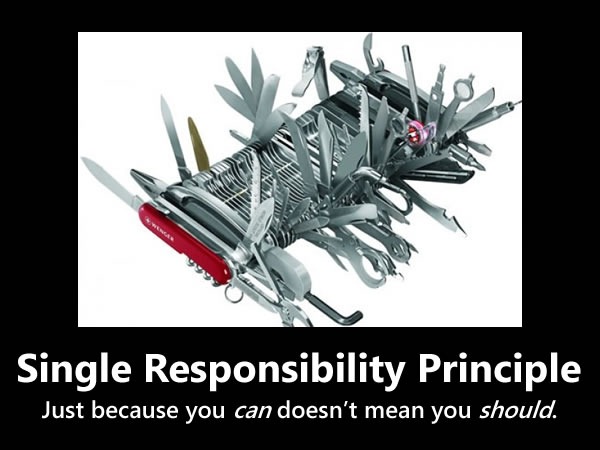
Single Responsibility Principle
single_responsibility_principle
The “S” in SOLID is for Single Responsibility Principle, which states that every object should have a single responsibility and that all of its services should be aligned with that responsibility. “Responsibility” is defined as “a reason to change”, and Wikipedia does a pretty good job of explaining it:
As an example, consider a module that compiles and prints a report. Such a module can be changed for two reasons. First, the content of the report can change. Second, the format of the report can change. These two things change for very different causes; one substantive, and one cosmetic. The single responsibility principle says that these two aspects of the problem are really two separate responsibilities, and should therefore be in separate classes or modules. It would be a bad design to couple two things that change for different reasons at different times.
Open-Closed Principle
open-closed_principle
The “O” in SOLID is for Open-Closed Principle, which states that software entities – such as classes, modules, functions and so on – should be open for extension but closed for modification. The idea is that it’s often better to make changes to things like classes by adding to or building on top of them (using mechanisms like subclassing or polymorphism) rather than modifying their code.
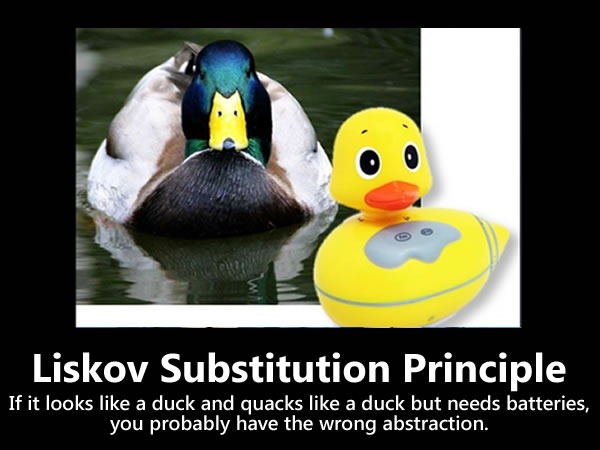
Liskov Substitution Principle
liskov_substitution_principle
The “L” in SOLID is for Liskov Substitution Principle, which states that subclases should be substitutable for the classes from which they were derived. For example, if MySubclass is a subclass of MyClass, you should be able to replace MyClass with MySubclass without bunging up the program.
Interface Segregation Principle
interface_segregation_principle
The “I” in SOLID is for Interface Segregation Principle, which states that clients should not be forced to depend on methods they don’t use. If a class exposes so many members that those members can be broken down into groups that serve different clients that don’t use members from the other groups, you should think about exposing those member groups as separate interfaces.
Dependency Inversion Principle
dependency_inversion_principle
The “D” in SOLID is for Dependency Inversion Principle, which states that high-level modules shouldn’t depend on low-level modules, but both should depend on shared abstractions. In addition, abstractions should not depend on details – instead, details should depend on abstractions.

Courtesy - http://blogs.msdn.com/b/cdndevs/archive/2009/07/15/the-solid-principles-explained-with-motivational-posters.aspx

http://www.codeproject.com/Articles/60845/The-S-O-L-I-D-Object-Oriented-Programming-OOP-Prin

SOLID Motivational Posters, by Derick Bailey, is licensed under a Creative Commons Attribution-Share Alike 3.0 United States License.

Seven Habits of Highly Effective Programmers


This advice by Philip Chu is highly influenced from Steven Covey in his best-selling book, The 7 Habits of Highly Effective People, but is really a high quality read - peppered with illustrative real world programmer tales. I am just putting bullets points and brief description in the blog here; however you must read the complete article at http://drupal.technicat.com/writing/programming.html. Also other articles at Philip’s site is certainly worth a read.

1.     Understand Your Requirements

The first step in becoming an effective programmer is to ensure that you are spending your time wisely. And there is no greater waste of time than in working on something that is not useful or never shipped. 

Gets a demonstrable system working as early as possible? 

Once you have something working, don't just leave it as a "proof of concept". Let people play with it, see their reactions, and let this guide and prioritize your development.

2.     Keep It Real

Keep your software running in as close to a shipping state as possible. You never know when you'll have to demo the system, send out an evaluation copy, or even deliver ("OK, time to wrap things up!") 

If you just test with sample data, that big iceberg of real data out there is going to sink your program, hence use real data.

The development build on your machine is not the real build, hence use real build machine.

Don't procrastinate on merging your code with the main code base - the longer you wait, the harder it gets

3.     Understand Your Code

Life is full of wonderful mysteries, but your code is not the place for them. You don't have to know how your car works - if the engine starts making strange noises, you drop it off the mechanic. When it comes to your code, if you don't understand how it works, or doesn't work, no one will. 

The best writers and coders have an esthetic and their work features structure and style that can often be identified with the author. 

You should periodically inspect your code, sweep up accumulated hard-coded numbers, outdated comments, misleading function names, or you'll inevitably end up with uninhabitable code that's embarrassing to show anyone else. 

Document your code as if someone else might have to take it over at any moment and know what to do with it. 

Ignore compiler and runtime warnings at your own peril. They are called "warnings" for a reason.

4.     Optimal Programming

On the other extreme from cut-and-pasters are those who change code just to make it look prettier (at least to them). While it's laudable to have a programming esthetic, it's a waste of time (and a useless risk) to change code just so it looks better to you.
"Refactoring" is all the rage, now, but programmers often take it to mean any code cleanup or redesign. The trick is in reorganizing code for the better without breaking anything. 

If you do need to optimize for speed or space in you application, attacking anything other than the bottleneck is a waste of time.

5.     Manage Thyself

You probably have a lot of complaints about your boss being a lousy manager, and you're probably right. So you have to be your own manager. Even if you have a decent boss, he's not going to stand behind you telling you what to type and how fast
Programmers are notoriously inadequate at providing useful schedule estimates. I think this is a bad rap, since management, left to their own devices, often make even worse predictions, and unwelcome news from engineers is often ignored. (A common theme in any engineering disaster). But still, awareness of the schedule is critical to actually getting the project done on time. 

You wouldn't just hop into your car before deciding where you want to go, right? And probably you have a route in mind before you start driving, too. Similarly, before you sit down at our computer, you should know what you want to accomplish that day and have some idea how.

6.     Continuous Education

A corporate soccer team member once asked me, as we were lacing up our cleats, "what's the secret to C programming?" If there was such a secret, I'd be hawking it on late night TV along with ab machines and how to get rich in real estate. Sorry, there's no shortcut - you have to learn and practice and make some mistakes. And you don't necessarily have to rely on corporate training or going back to school - there are plenty of (inter)national and local professional groups, books, and of course, the Internet. 

It's called "computer science" for a reason. It's easy (maybe too easy) for anyone to to start programming, without a formal computer science education. In particular, those from other engineering and science disciplines can pick up programming quickly and make a good living. But to effectively tackle non-trivial tasks, you need to know the inherent capabilities and limitations of software and recognize prior work, so you don't waste time reinventing the wheel, badly. You don't have to know everything under the sun, but you should have at least a cursory familiarity with many areas and be prepared to do some additional research as necessary.

7.     R-E-S-P-E-C-T

One requirement for being an effective software engineer is to be taken seriously. You need to have the respect of your peers and managers, at least for your technical capabilities, to have control over your own work and influence over others. 

Engineers sometimes communicate more to show off their own knowledge rather than to inform (although, if you can do both, kudos to you). This is often inflicted in employment interviews, under the guise of "finding out how you think" the candidate is asked inane puzzle questions. This can backfire, though, if the candidate has any self-respect.

Generate PDF with ASP.NET and iTextSharp


PDF is a popular file format for documents. Due to their ubiquity and layout capabilities, it's not uncommon for a websites to use PDF technology. There are a variety of .NET libraries available to programmatically create PDF documents. Perhaps the most popular is iTextSharp, which is also a free to use API.

Using iTextSharp we can print the any kind of html, CSS & images on the PDF Document. I am using the iTextSharp to Print the the DataList in PDF format. DataList is Loaded Dynamically By Value Which Contain Text and images to print on the PDF Document . Below is the code to convert DataList Into a PDF Document.

Below is the code:

Web Form : PDF.aspx

Below is the datalist which is used for rendering the content directly to HTMLTextWriter object. Sometimes you may need to display datalist differently on web page and pdf. In that case you can have a duplicate datalist control with visibility set to none. In this duplicate control, you can have html format as you want in the PDF.

<asp:DataList ID="m_ctlPdfGuide_DataList" runat="server">

<ItemTemplate>

<asp:Label CssClass="largeName" runat="server" ID="m_ctlHotelName" Text='<%#Eval("BrochureItemName")%>'> </asp:Label>

<asp:Image ID="m_ctlBrochureItemImage" Height="50px" Width="100px" ImageUrl='<%#GetImageUrlPDF(Eval("BrochureItemImageName"))%>' Visible="true" runat="server" />

<asp:Label ID="Label1" CssClass="address" runat="server" Text='<%#Eval("BrochureItemAddress")%>'></asp:Label>

<asp:Label ID="Label2" CssClass="description" runat="server" Text='<%#Eval("BrochureItemDescription")%>'></asp:Label>

</ItemTemplate>

</asp:DataList>

<asp:Button ID="m_ctlPrintGuide_Button" CssClass="search_btn" runat="server" Text="Save Guide" OnClick="m_ctlPrintGuide_Button_Click" ToolTip="Save Guide To Your Desktop" />


Code-Behind: PDF.CS

On Button Click We create a pdf document and save any where on our Desktop.

protected void m_ctlPrintGuide_Button_Click(object sender, EventArgs e)

{

string attachment = "attachment; filename=TravelGuide.pdf";

Response.ClearContent();

Response.AddHeader("content-disposition", attachment);

Response.ContentType = "application/pdf";

// Rendering DataList into HTMLTextWriter

StringWriter swHtml = new StringWriter();

HtmlTextWriter hTextWriter = new HtmlTextWriter(swHtml);

m_ctlPdfGuide_DataList.RenderControl(hTextWriter);

try

{

using (Document doc = new Document(PageSize.A4))

{

using (PdfWriter w = PdfWriter.GetInstance(doc, Response.OutputStream))

{

doc.Open();

// Getting City Name From Session

string cityName = string.Empty;

if (!string.IsNullOrEmpty(SessionUtil.GetCurrentCityNameFromSession()))

cityName = " to " + SessionUtil.GetCurrentCityNameFromSession();

//add guide header

Chunk c = new Chunk("Your Guide" + cityName + "\n", FontFactory.GetFont("Verdana", 15));

Paragraph p = new Paragraph();

p.Alignment = Element.HEADER;

p.Add(c);

doc.Add(p);

//add columns

MultiColumnText columns = new MultiColumnText();

columns.AddRegularColumns(36f, doc.PageSize.Width - 36f, 25f, 2);

// Set margin to document

doc.SetMargins(0f, 8f, 8f, 10f);

// Apply CSS to DataList for style

StyleSheet style = new StyleSheet();

style.LoadTagStyle(HtmlTags.IMG, HtmlTags.WIDTH, "220px");

style.LoadTagStyle(HtmlTags.IMG, HtmlTags.HEIGHT, "80px");

style.LoadStyle("address", "style", "font-size: 8px; text-align: justify; font-family: Arial, Helvetica, sans-serif;");

style.LoadStyle("largeName", "style", "font-size: 10px; text-align: justify; font-family: Arial, Helvetica, sans-serif;");

style.LoadStyle("description", "style", "font-size: 8px; text-align: justify; font-family: Arial, Helvetica, sans-serif;");

// Reading value Of DataList to write on the PDF Document

using (StringReader sr = new StringReader(swHtml.ToString()))

{

List<IElement> list = HTMLWorker.ParseToList(sr, style);

foreach (IElement elm in list)

{

columns.AddElement(elm);

doc.Add(columns);

}

}

doc.Close();

Response.Write(doc);

Response.End();

}

}

}

catch

{

//throw new ApplicationException("Oops! Error occurred while downloading the Travel Guide! "+ ex.ToString());

}

finally

{

swHtml = null;

hTextWriter = null;

}

}

When Document Is Created it looks like This:

Below is the screen shot of the document

clip_image001

Happy Coding!!